OO programming concepts, continued
In this lecture we continue the overview of object-oriented programming concepts. We take a detailed look at object comparison mechanisms, and double dispatch as an advanced polymorphic concept.
Lecture upshot
Use equals for comparing objects, not ==. Replace hard coding combinations of classes by polymorphic delegation, using double disatch. Don't catch any excepetion.
Object comparison
- For primitive values it is standard to run comparisons using the
==operator. - However, comparing objects with
==is bad practice and should be avoided in most cases. - We'll now take a look at the underlying concepts of
==, retrace the issue for object-comparison, and finally learn how to correctly compare objects.
Variable model recap
The value stored in a java variable depends on the variable type:
- Primitives: the variable directly stores a value, e.g. for an
intthe value42, or forcharthe valueM. - Objects: the variable stores the address in memory allocated to the target object.
== is not safe for object comparison
== always compares the variable value, regardless of its type.
Illustration: comparing primitives
- When comparing primitives, the corresponding variable values are compared directly.
- This is fine, because we compare the value of two variables (
a: 42,b: 42). 42is identical to42so the==operator correctly evaluates totrue.
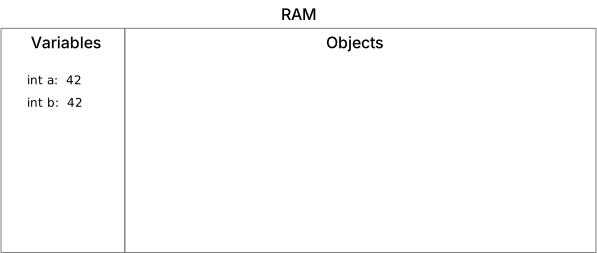
Illustration: two primitive variables, no objects allocated.
Illustration: comparing objects
- For objects, the variable does not directly store the object's value, but the memory reference towards the space allocated to the object.
- An example are
Stringobjects: we don't know how long a string is, so it cannot be a primitive - the longer theString, the more memory must be allocated.
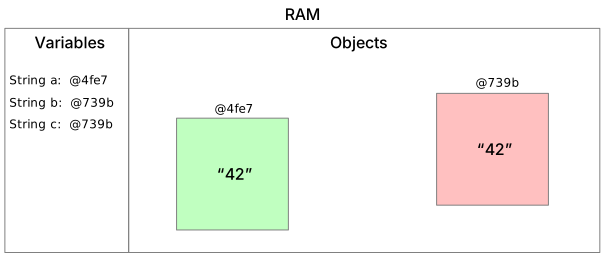
Illustration: three
Stringvariables, referencing two objects in memory.
- As before, the
==operator merely compares the values for each variable. - But wait! The values are only references -
a == bcompares@4fe7(reference for Stringa) is not the same as@739b(reference to Stringb), so the==operator correctly resolves tofalse
This is most likely not what the programmer had in mind. In the above illustration we see both objects have the same
content: "42".
Intuitively we would have expected == to return true, for the two objects are equal.
Can object comparison with == ever return the expected result ?
Yes, we can be lucky and compare two references to the same object. In the above example b == c would have returned true, since both variables reference the same object.
Equals
- As previously seen, direct comparison of variable values does not match our intuitive understanding of variable comparison - we do not want to compare variable references, but the objects stored behind these references.
- A second caveat is: We are not interested if the objects are identical, we are interested in whether they are equal
:
- Identical: the two variables point to one and the same object (we already have the
==operator for that) - Equal: the two variables point to objects that can be considered semantically indistinguishable.
- Identical: the two variables point to one and the same object (we already have the
Delegation
Our goal is to have a reliable equals method, to tell us if two objects are semantically identical.
- Unfortunately, we cannot implement a universal comparison method: Every class has different fields to compare, and
they may not all be relevant to determine equivalence.
- In fact, all classes
inherit a default
equalsmethod from the implicitObjectsuper-class - but its implementation is deceiving: it simply calls the==operator.
- In fact, all classes
inherit a default
- Hence, we do not implement a universal comparison mechanism, but delegate comparison to the objects themselves. We
call a special
equalsmethod on one object, and let it determine itself whether it is semantically identical to the other.
Have we already seen this concept of delegating to an unknown implementation ?
Yes! That is polymorphism. We don't know how the equals method is implemented, and we don't care - as caller we simply let the object figure out itself how to run the comparison.
Implementation
- When implementing an equals method, we must figure out if an object (
this) is semantically identical to another object (other), passed as parameter. - So the resulting method signature is:
For implementing this method, we need to consider a few possibilities:
- Is the other reference actually the identical object (we're comparing to ourselves):
If yes -return true - Is the other reference actually an object, and not just
null.
If not -return false; - Is the other object actually something compatible (we cannot compare apples and pairs.)
If not -return false; - Is the other object semantically identical, in terms of all fields that matter.
Note: Objects may reference other objects, so when implementing 3. we must not blindly use
==for all field comparisons.
Most of the time, the equals method in the end looks somewhat like:
@Override
public boolean equals(Object o) {
  // 1)
  if (this == o) {
    return true;
  }
  // 2), 3)
  if (o == null || getClass() != o.getClass()) {
    return false;
  }
  Bar b = (Bar) o;

  // 4) Compare relevant fields (foo is primitive, baz is an object)
  return foo == b.getFoo() && baz.equals(b.getBaz());
}
Use the power of your IDE
Writing an equals method is mostly boiler-plate code. You can use an IDE to generate the code, based on a quick selection menu of which object fields matter for comparison.
Sorting
- In some scenarios testing for equivalence is not enough.
- E.g. for sorting we need a notion of order, i.e. when directly comparing two objects we need to know which object is considered "smaller", respectively "larger" than the other.
Example
- For a list of
Integervalues[1, 4, 3, 2], we would all agree that sorting should result in[1, 2, 3, 4]. - But what if we have a list of
Studentobjects ?- Should we order by registration number ?
- Should we order by date of birth ?
- Should we order by name, alphabetically ?
Semantic
- Java comes with a built-in
interface:
Comparable<T> - The interface provides only a single
method:
compareTo(T o)
Note that the interface uses
Genericsto define which classes an object can be compared to. We'll take a detailed look atGenericsin the next lecture.
- Implementations of the
compareTomethod are expected to respect the following:- Returns a negative
intwhenthisobject is less than the other object (o). - Returns zero when
thisobject is equal to the other object (o). - Returns a positive
intwhenthisobject is greater than the other object (o).
- Returns a negative
There is no default compareTo implementation
Unlike the equals method, the base Object class does not provide a default implementation to compareTo. The Comparable interface must be implemented to use sorting in collections and arrays.
Usage
The key advantage of the Comparable interface is that it ensures seamless integration of custom classes with existing
java utils, notably collections and arrays.
Given a student implementation:
public class Student implements Comparable<Student> {

  private String name;
  private int birthYear;
  private long identifier;

  // Constructor, getters...

  @Override
  public int compareTo(Student o) {

    // Must return negative value if this is less than other
    return birthYear - o.birthYear;
  }

  // toSting method
}
We can now easily sort students based on whatever criteria was implemented in compareTo:
main() {
  // Create a list with some students
  Student knuth = new Student("Knuth", 1938, 394876339);
  Student turing = new Student("Turing", 1912, 438579348);
  Student lovelace = new Student("Lovelace", 1815, 564598398);
  Student hopper = new Student("Hopper", 1906, 983567346);
  List<Student> students = new LinkedList<>();
  students.add(knuth);
  ...

  // Sort (this internally calls the compareTo method)
  Collections.sort(students);

  // Then print students
  for (Student student : students) {
    System.out.println(student);
  }
}
Prints:
Student [name=Lovelace, birthYear=1815, identifier=564598398]
Student [name=Hopper, birthYear=1906, identifier=983567346]
Student [name=Turing, birthYear=1912, identifier=438579348]
Student [name=Knuth, birthYear=1938, identifier=394876339]
What needs to be changed to sort students by name instead?
Name is a String. In the compareTo implementation, we just delegate to String's existing compareTo method: return name.compareTo(o.name);
Hashcode
- In some cases, comparing or finding objects can drastically reduce performance (e.g. many objects to compare, objects with many fields).
- A common engineering trick to speed things up, is to once compute a "fingerprint" for each object.
- Can be easily computed, based on the object's fields.
- Is "close to" unique.
- Can be easily compared
- The common mechanism to compute such fingerprint is "Hashing", also called digest.
- Some classes, e.g.
Stringcome with a build-in hashing mechanism. For others, be have to provide our own implementation.
MD5 example
As illustration, let's take a look at "Message Digest 5", or simply MD5 hashing.
- Any series of bits can be used is input.
- Input can be long or short.
- Input can be strings, serialized java objects, images...
- The MD5 function produces fixed length series of bits (represented as hexadecimal string).
| Value | MD5 Hash |
|---|---|
Maximilian |
3b7e729d70a604751ff8d993b0f247f7 |
MGL7010 |
f4ee9623b54932983bfefab256366155 |
Collisions are guaranteed
Since we're mapping an unlimited input set to a limited output set, collisions must exist. Object comparison should not be performed, uniquely based on hash comparison.
A visual collision example are these two images of a ship and a plane:


What is the causality between equals and hashCode?
Two objects considered equal must return the same hashCode, but the inverse is not necessarily true.
Some provided java classes, e.g. "String" have a default hashCode implemenation. Those have collisions, too. E.g. " Teheran" and "Siblings" have the same hashCode result.
Hashcode implementation
Similar to the equals and compareTo function, it all depends on which fields must be considered for creating a hash.
Afterwards it is off-the-shelf code, for example for our Student class we can provide a hashCode implementation like
so:
Hashed collections
With hashCode provided, we can now efficiently use data structures using internal hash tables:
main() {
  // Create some students
  Student knuth = new Student("Knuth", 1938, 394876339);
  Student turing = new Student("Turing", 1912, 438579348);
  Student lovelace = new Student("Lovelace", 1815, 564598398);
  Student hopper = new Student("Hopper", 1906, 983567346);

  // Create a hashSet, to quickly find objects:
  Set<Student> students = new HashSet<>();
  students.add(knuth);
  students.add(turing);
  students.add(lovelace);
  students.add(hopper);

  // Search for specific entry, without having to traverse all set:
  System.out.println(students.contains(lovelace));
}
Prints: true
Double dispatch
- With
equals,compareToandhashCodewe've seen three examples where behaviour is delegated to an object. - We also call this technique single dispatch, for decision on a specific behaviour is delegated to the object type at runtime.
- Next we take at an advanced variant of this technique, called double dispatch.
Idea
- Double dispatch, just like single dispatch, is about delegating type-based behaviour to an object at runtime.
- The difference is that with double dispatch the behaviour is dependent on two types, which both contribute to the decision at runtime.
Shape example
We can consider the following scenario. There are several classes for shapes, e.g.
SquareTriangleCircle
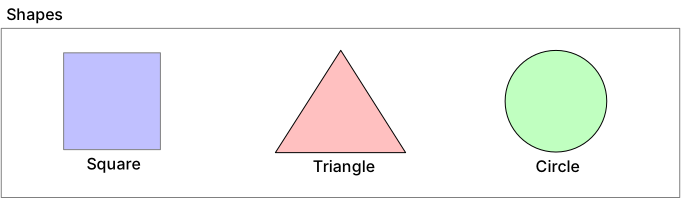
If we are now interested in implementing a mechanism to tell as what an intersection looks like, we can easily visualize that the outcome strongly depends on the two involved types at runtime:
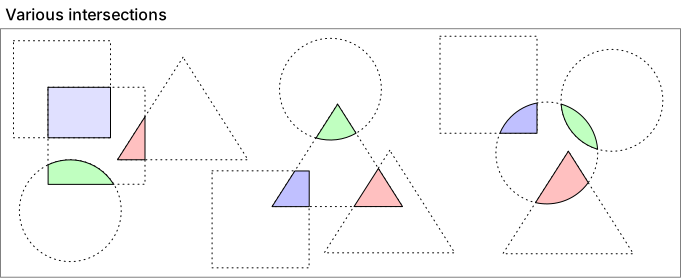
Implementation
- Intuitively, we could attempt to implement polymorphism by overloading an
intersectmethod with subtypes. - Unfortunately this will not do, as method parameters are bound at compile time, not at runtime: There is no polymorphic method overloading in Java.
The trick is to turn away from polymorphic method parameters to a dedicated class for the dispatches: We call this class
a Visitor, the Shapes welcome a visitor for each dispatch, and let the visitor figure out how to proceed:
classDiagram
  class ShapeVisitor {
      <<Interface>>
      +visit(Square)
      +visit(Triangle)
      +visit(Circle)
  }

  class IntersectionVisitor {
      <<Class>>
      +visit(Square)
      +visit(Triangle)
      +visit(Circle)
  }

  class SquareVisitor {
      <<Class>>
      +visit(Square)
      +visit(Triangle)
      +visit(Circle)
  }

  class TriangleVisitor {
      <<Class>>
      +visit(Square)
      +visit(Triangle)
      +visit(Circle)
  }

  class CircleVisitor {
      <<Class>>
      +visit(Square)
      +visit(Triangle)
      +visit(Circle)
  }

  ShapeVisitor <|.. IntersectionVisitor: implements
  ShapeVisitor <|.. SquareVisitor: implements
  ShapeVisitor <|.. TriangleVisitor: implements
  ShapeVisitor <|.. CircleVisitor: implements
What are visitors, at the end of the day ?
Visitors embed behaviour for specific shapes / combinations of shapes in code.
Sample code
IntersectionVisitor(excerpt):public class IntersectionVisitor implements ShapeVisitor { // Stores shape internally, for second dispatch. private Shape firstShape; public IntersectionVisitor(Shape firstShape) { this.firstShape = firstShape; } public void visit(Circle circle) { // Second dispatch assignment and call firstShape.acceptAndVisit(new CircleVisitor()); } //... }CircleVisitor(excerpt):Square/Triangle:- Launcher:
Step by step
Step by step, what happens:
mainis called- First dispatch, accept: Circle.acceptAndVisit is called (Payload is a new
IntersectionVisitorwithTriangleobject stored inside) - First dispatch, visit: IntersectionVisitor.visit is called (Payload is
Circleobject, passed asthis) - Second dispatch, accept: Triangle.acceptAndVisit (IntersectionVisitor passes
CircleVisitorto internally storedTriangleobject) - Second dispatch, visit: CircleVisitor.visit is called, with
Triangleobject as argument (Trianglefrom previous call passed itself asthis)
Error handling
- Error handling in Java distinguishes between three different levels of severeness.
- Depending on which level of severeness we're dealing with, other recommendations (or compiler-level requirements apply)
- Common to all categories is that they represent an interruption in the usual program execution. Java has a built-in
Object to store information on the nature of the
issue:
Throwable - Each concept is itself a class extension to this base concept:
  classDiagram
    class Throwable {
        <<Class>>
    }

    class Exception {
        <<Class>>
    }

    class Error {
        <<Class>>
    }

    class RuntimeException {
        <<Class>>
    }

    Throwable <|-- Error: extends
    Throwable <|-- Exception: extends
    Exception <|-- RuntimeException: extends
In the following we'll take a closer look at the three categories and conditions they entail.
Checked exceptions
-
Checked exceptions are the most benign category. They cover situations that need deviation from the aspired execution path, but generally can be fixed.
-
Examples:
IOExceptionwhen accessing a network resource. No need to fully stall the program, but the user should be prompted about the issue.FileNotFoundExceptionwhen accessing a resource on disk. Likely the provided path only contains a typo, and can be fixed.ParseExceptionwhen trying to deserialize an object. Possibly the wrong object was provided and a reattempt is possible.
-
Compiler requirements: For anything that can go wrong, and is likely to go wrong from time to time, the compiler requires explicit exception handling.
- Option 1: Declaring the method possibly
throwsa checked exception, in method signature. - Option 2:
Catching the exception in place, and implement error handling.
- Option 1: Declaring the method possibly
It must be either or
Checked exceptions must be handled: either by declaring them in the method signature or by catching. If neither is applied the compiler will reject the program.
Declaring throws in signature
Declaring an exception thrown via method signature is the equivalent of saying "If bad things happen, this is not my problem."
The syntax for declaring an exception is potentially being thrown is:
public void doSomethingThatMayFail() throws IOException {

  // Some code here that potentially throws IOException
}
Methods may declare throws for multiple exceptions, in that case they are simply separated by commas:
public void doSomethingThatMayFail() throws IOException, FileNotFoundException {

  // Some code here that potentially throws IOException

  // A bit later more code that potentially throws a FileNotFoundException
}
Catching in place
Catching in place is the equivalent of saying "If things go wrong, I'll handle it right away".
If caught, an exception is "defused", i.e. the catch block defines what should happen if the corresponding exception
arises:
public void doSomethingThatMayFail() {
  try {
    // Sending the program execution to sleep for a while (this may fail with a checked exception)
    Thread.sleep(1000);
  } catch (InterruptedException e) {
    System.out.println("Something went terribly wrong when putting the program to sleep.");
  }
}
Don't catch the Exception superclass
Inexperienced programmers tend to use catch(Exception e)... well duh, take a look at the exception hierarchy, this covers all exceptions, and your catch block is likely triggered for unrelated issues. Always catch specific exception types, never the common Exception superclass!
Runtime exceptions
-
Runtime exceptions (also called "unchecked exceptions") are the more severe category. They cover situations that indicate serious programming bugs. Usually they are not handled, as the cure is not to react at runtime, but to fix the code.
-
Examples:
NullPointerExceptionwhen accessing anullvariable.DivisionByZeroExcetpionwhen performing an arithmetic division by0.ArrayIndexOutOfBoundsExceptionwhen accessing an inexistant array position.
-
Compiler requirements: None, the compiler cannot prevent these from happening, and does not require their handling at runtime.
Runtime exception handling
Code wise, the best is to just ignore runtime exceptions. If your program has a bug, do not try to conceal it - fix that bug!
- Do not declare them as
throwsin the method signature: - Do not create
try-catch-blocksaround risky statements:
Custom exceptions
- Exceptions are just classes. You can absolutely define your own custom exceptions for your own exceptional situations that require error handling.
- Think about the character of your exception:
- If it indicates a situation that can be handled, make it a checked exception:
YourException extends Exception - If your exception indicates a programming bug, make it a runtime
exception:
YourException extends RuntimeException
- If it indicates a situation that can be handled, make it a checked exception:
/**
 * Custom exception to be thrown whenever access to a model breaks consistency with existing model
 * state, e.g. usage of a player index out of bounds, or attempting to claim or clear a field that
 * is already taken or not owned.
 */
public class ModelAccessInconsistencyException extends RuntimeException {
  /**
   * Custom exception constructor.
   *
   * @param errorMessage as the String message to assign to the exception object.
   */
  public ModelAccessConsistencyException(String errorMessage) {
    super(errorMessage);
  }
}
Do not use exceptions as regular control flow tool
Exceptions have the powerful ability of intercepting code in the midst of execution and jumping directly to the corresponding catch block. Do not use this mechanism for regular control flow tasks - java has no jump / goto instruction, for a good reason. Exceptions are reserved for exceptional situations, i.e. situations that require immediate handling to prevent a program crash.
Errors
A last category are Errors. Errors translate to major and catastrophic issue, and the best thing is to shut down
the JVM altogether.
While it is possible to catch Errors (subclass of Throwable), catching an Error is extremely uncommon and most
likely not what you want.
For example if the JVM runs out of resources with a VirtualMachineError, there simply is not much you can do.
Recap
| Category | Example | Handling |
|---|---|---|
| Checked exception | FileNotFoundException |
Throw declaration or catch required by compiler |
| Runtime (unchecked) exception | NullPointerException |
Throw declaration or catch not required |
| Error | VirtualMachineError |
Should not be handled |
Why does software documentation usually only mention checked exceptions ?
Usually, you'll only see checked exceptions in JavaDoc software documentation, because these are the only exceptions mentioned in method signature (throws keyword). If a checked exception is thrown, the method caller must know about its details to properly react. Runtime exceptions and errors on the other hand signify program bugs or severe execution errors. Those should not be documented but fixed.
Literature
Inspiration and further reads for the curious minds:
- Java HashSet API
- Baeldung: Java
equalsandhashCodeas contracts - Java Design Patterns - Object collision with double dispatch
- Java Exception API
Here's the link to proceed to the lab unit: Lab 04