Design patterns
As we write software. some generic design challenges seem to pop up again and again. And while it is honorable to gradually invent your custom toolkit for these design challenges, there is no need to reinvent the wheel: Over time, the software engineering community has gathered a body of reusable solutions, called design patterns. Although reusable, these are not just code libraries, providing specific functionality, but abstract guidance on how to arrange your code's classes and methods, to best match recurring design problems.
Lecture upshot
In this lecture we'll take a look at a selection of design patterns: "Singleton", "Composite", and "Command".
Motivation
Design patterns are reusable macro-patterns. The serve as templates, which can be followed as reliable design strategies for specific recurring design problems.
Throughout this lecture we'll look at three categories of design patterns:
- Factory patterns (or creational patterns): targeting object creation.
- Structural patterns: targeting arrangements of classes for structuring state.
- Behavioural patterns: targeting algorithms and object comportment.
Factory patterns
Factory patterns (also called Creational Patterns) target the object creation process. Common interests, according to the "Gang of Four"are:
- "[...] encapsulate knowledge about which concrete classes a system uses."
- "[...] hide how instances of these classes are created and put together."
Today we'll only look at a single factory pattern to illustrate these characteristics.
Singleton
Intent
"Make sure there is only a single entity for a given class."
Motivation
We want to store user inputs in an in-RAM database. To ensure consistency, there must be only one database object.
Pattern: Conceal the classes constructor and gain control over object creation with a static access method.
UML Diagram
In UML, we indicate private methods with a -. Note how the constructor is private:
classDiagram
    direction TB

    class Database {
    <<class>>
    - Database()
    + getInstance()*
    }

    Database *--> "0..1"Database: singleton reference
Usage
For applying the pattern we only need three things:
- Make sure the constructor is
private. - Introduce a
privateinternal field for the one and only singleton reference. - Offer a
publicandstaticgetInstance()method, managing the singleton reference.
Sample code:
class Database {

  private static Database singletonReference = null;

  /**
   * Private constructor, so no one else can create entities.
   */
  private Database() {
    // Do whatever needs to be done to set up database here
    // (not relevant for singleton pattern)
  }

  /**
   * Provides access to the singleton reference.
   * If not yet initialized creates a new Database object.
   * Otherwise returns the one and only existing object.
   */
  public static Database getInstance() {
    // If not yet initialized, create a first database object.
    if (singletonReference == null) {
      singletonReference = new Database();
    }
    // afterwards / else just return the reference already existing
    return singletonReference;
  }
}
Applying the pattern is only half the way, we still need to use the pattern in action. Luckily calling the pattern is easy:
- We simply call
getInstance, whenever you we the one and only Database object. - The singleton pattern will ensure you always receive the same reference.
Why is the Objenesis library so problematic?
Objenesis uses reflection to create new objects, even if the constructor is private. That said, we can use Objenesis to outsmart the singleton pattern - while technically feasible it probably is not the brightest idea. Singletons fulfill a purpose, and should be resepected. Just imagine multiple database objectsa are suddenly floating around - we would instantly run into hard-to-debug inconsistencies!
On singletons and equals
-
If correctly implemented, any singleton reference obtained must point to the same object:
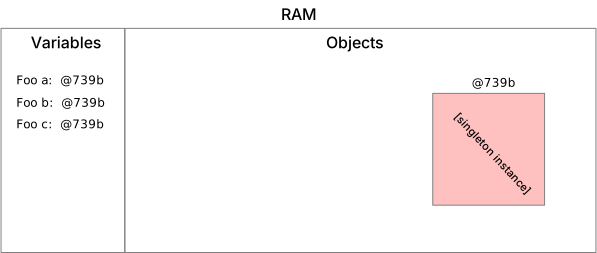
-
That said, we can conclude that unlike other objects, singleton comparison with
==is secure.- We can distinguish from null.
- We can distinguish from other objects.
- We do not need to distinguish from other objects, based on object content.
-
Some novices (or very lazy programmers) tend to sidestep implementing proper
equalsmethod by making every class a singleton. - Unfortunately this instantly eliminates the interest of object-oriented programming.
Define singletons with care.
Singletons break with the object-oriented philosophy, where any class can be instantiated as many times as desired. Never turn a class into a singleton only to overcome programming difficulties. Singletons have a defined purpose, being too lazy to write a proper object comparison implementation is not among them.
Structural patterns
So far we've only dealt with patterns for object creation. But not all design challenges are about object creation. Often times we are less troubled with creating an object, than with the information it should contain, and how to best structure this information into class and object relations.
Structural patterns are concerned with how classes and objects are composed to form larger structures. - Gang of Four, Design Patterns, p137
Composite
Intent
The composite patterns helps with creating complex object structures, allowing to handle arbitrary parts of these structures consistently.
Motivation
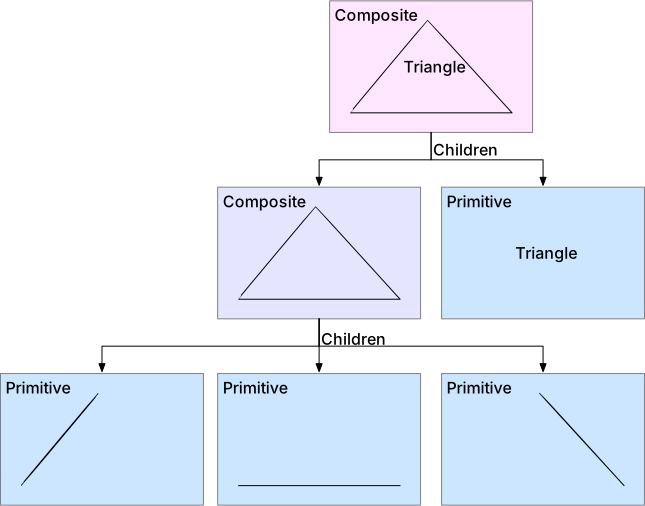
A common example are elements in a drawing program:
- text and lines as primitive structures.
- additionally, more complex shapes made out of primitives.
- possible even massive grouped structures consisting of primitives and shapes.
Illustration:

As a result we have different element types (primitives, objects, grouped objects), but the operations we perform are actually not-dependent on element types:
- Moving an element
- Scaling an element
- Adding / removing an element
UML Diagram
The composite pattern inherently represents a nested structure, similar to a tree-shaped graph. Each node in the tree (a component) can either take form of a leaf (primitive) or be itself a composite (object / group):
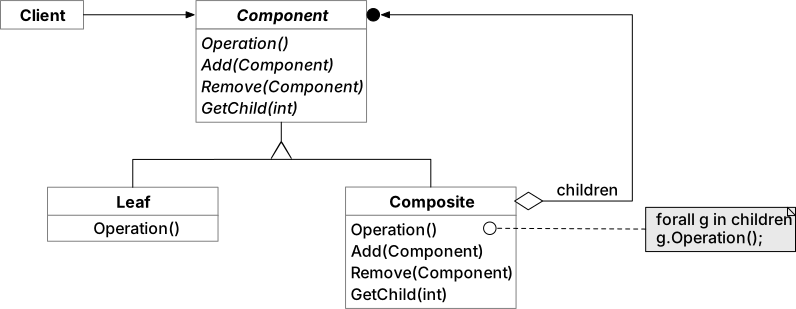
At the end of the day, no matter if we're dealing with text, a line, a rectangular object, or a grouping of objects: we can treat of them consistently as components in our drawing and apply a static set of operations, e.g. move, scale, add, ...
Which basic design principle is violated by the Leaf class ?
The Liskov substitution principle. Leaf restricts the set of functionality provided by its superclass Component. Leafs cannot have children, therefore it is not possible to add, remove or get sub-components.
Usage
So to start we need a class representing the composite component. In our graphical-editor example, this can be an
abstract class or interface Graphic:
/**
 * This interface represents the "Graphic" in the composite pattern.
 * It can be implemented / subclassed by primitives or composites.
 */
interface Component {

  void move(int x, int y);

  void add(Component component);
}
After having created other primitives, we can construct a composite structure and apply composite operations, e.g. move.
public static void main(String[] args) {
  // Here we create some sample primitives
  Component line1 = new Line(0, 0, 4, 0);
  Component line2 = new Line(0, 0, 2, 2);
  Component line3 = new Line(2, 2, 4, 0);

  // Here we create a triangle, consisting of "primitives" (lines)
  Component triangle = new Composite();
  triangle.add(line1);
  triangle.add(line2);
  triangle.add(line3);

  // Finally we create a group of triangle and text
  Component text = new Text("TriangleText", 2, 1);
  Component group = new Composite();
  group.add(triangle);
  group.add(text);

  // Moving the group will recursively apply move operation on all (deep) children:
  group.move(2, 3);
}
The final move call is interesting, because we apply it on a Composite structure. By consequence the move
operation must be propagated recursively down to all primitives in the component structure.
What is the total composite object structure used for propagating move ?
Behavioural patterns
So far we've seen patterns for object creation and structural patterns of objects and classes. In this last segment we take a peek at patterns for algorithms and comportment.
Once more, the "Gang of Four" provides attainable guidance:
Behavioural patterns are concerned with algorithms and the assignment of responsibilities between objects. Behavioural patterns describe not just patterns of objects or classes but also the patterns of communication between them. These patterns characterize complex control flow that's difficult to follow at run-time. They shift your focus away form flow of control to let you concentrate just on the way objects are interconnected.
Have you already seen patterns matching some of these descriptions?
Yes! We've already seen two behavioural patterns in this course: The observer pattern, and the double-dispatch pattern.
In this section we'll look at an exemplary behavioural patterns to further illustrate these characteristics.
Command
Intent
"Encapsulate a request as an object, thereby letting you parameterize clients with different requests, queue or log requests, and support undoable operations."
-- GoF, Design Patterns
Motivation
The command pattern becomes interesting when you seem to separate between the moment an action is triggered and the moment it is executed. A prominent example are UI menus.
- A button triggers a comportment, but you rarely want to implement the required logic directly as part of the UI code.
- Using a dedicated "command" object lets you encapsulate an expected action, for it to be executed elsewhere.
- The command object can be passed around like any other object.
- In fact, the object creator can even be entirely agnostic about where exactly the command object is eventually executed!
- Optionally the concrete command objects can themselves hold a reference to a receiver, on which it performs itself
when
executeis requested.
UML Diagram
Independent of which menu item was clicked, there is a common mechanism: A command object is created and executed.
A series of executed commands automatically enables a command history and corresponding undo/redo operations.
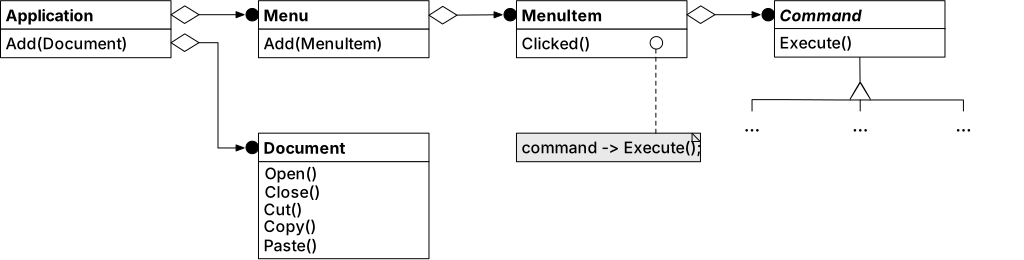
Image credit: GoF - Design Patterns, p233.
Usage
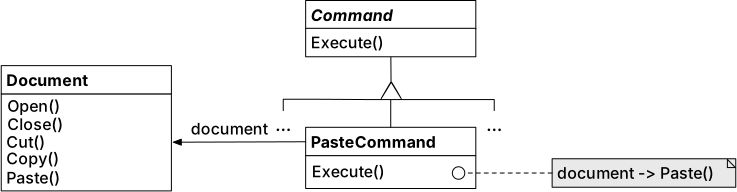
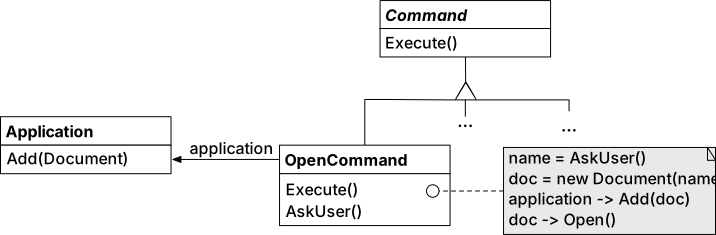
Following the command pattern we can easily associate UI elements, e.g. menu buttons, with behaviour:
- A UI element creates a new concrete command.
-
The command internally embodies a behaviour to
execute()-
Can be simple, i.e. delegate a
paste()call:
-
Can be more complex, i.e. prompting the user for a document name, before creating a new document:
-
Literature
Inspiration and further reads for the curious minds:
- Head First - Design Patterns
- Erich Gamma, Richard Helm, Ralph Johnson, John Vlissides - Design Patterns
Here's the link to proceed to the lab unit: Lab 08