Design Patterns II
In the unit we'll extend our previous repertoire of design patterns by a selection of three novel patterns, the " abstract factory", the "flyweight". and the "decorator" pattern.
Factory patterns
In the previous course we've already delved into a first factory pattern, the "singleton pattern".
What is the key interest of the singleton pattern ?
The key interest of the singleton pattern is to ensure a given entity exists at most once. It conceals object creation behind a getInstance method, internally preventing competing entities.
In the following we'll take a closer look at a second creational pattern, the "abstract factory" pattern, which often comes in handy for defining common denominator for alternative factories.
Abstract Factory
Intent
"Provide an interface for creating families of related or dependent objects without specifying their concrete classes."
-- GoF, Design Patterns
Motivation
We want different look and feels, i.e. different appearance for UI elements:
-
"Light UI", with scrollbar always visible:

-
"Dark UI", with scrollbar only visible while scrolling:

Can you think of other examples ?
Pretty much anything that offers alternative UIs. Mac OS light, dark mode, but also more drastic alternatives, such as IntelliJ's classic (powerful, for pros) versus modern (minimalistic, for n00bs) UI.
Where's the caveat ?
- We always need the same elements (or close to the same).
- They are different in nature and behaviour.
- Disposition of elements
- Apparel of elements
- Behaviour of elements
- Hard coding a specific look and feel will be tedious to change later.
Pattern: Create a common abstract factory class, individual look and feels can then provide their own factory.
UML Diagram
The gist of the abstract factory patter is to have multiple factories (e.g. one for each look and feel), both implementing the same abstract class or interface.
- Rather than hard coding a specific factory for object creation all over the codebase, a specific factory is selection once (can be stored in a variable).
- The abstract factory defers creation of products (Scroll bars, windows, ...) to concrete factory implementations.
- Switching to another look and feel is easy, because both factories implement the same interface or superclass.
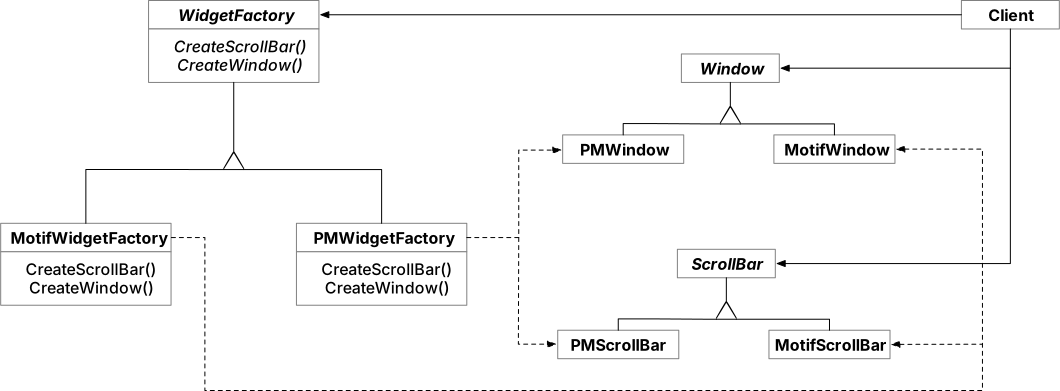
Image credit: GoF - Design Patterns, p87.
Usage
For applying the pattern, we only need to make sure all alternatives (factories) adhere to a common abstract factory:
- Start with a common interface or abstract class:
-
Then implement adhering factories:
- Motif factory (Motif = X Window System GUI toolkit):
- PM factory (PM = IMB OS/2 Presentation Manager):
-
Finally, to use either one or the other UI look and feel, we just need to once assigne one of the concrete factories to a factory variable:
  public static void main(String[] args) {
  // Here we decide for "Motif", but we can easily toggle
  // for a different look and feel.
  AbstractFactory lookAndFeelFactory = new MotifWidgetFactory();

  // The remainder is completely independent
  // of which factory was initialized:
  Window myFirstWindow = lookAndFeelFactory.createWindow();
  Window mySecondWindow = lookAndFeelFactory.createWindow();
  ScrollBar myFirstScrollBar = lookAndFeelFactory.createScrollBar();
  // and so on ...
}
Other factory patterns
Below an incomplete list of additional factory patterns (some of them exceeding the scope of this course):
- Builder: Separate the construction of a complex object from its representation, so the same construction process can create different representation.
- Factory method: Define an interface for creating an object, but let subclasses decide which class to instantiate. ( Light version of abstract factory.)
- Prototype: Specify the kinds of objects to create using a prototypical instance. Create new instances by cloning the prototype.
Structural Patterns
In the previous course we've already delved into a first factory pattern, the "composite pattern".
What is the key interest of the composite pattern ?
Defining uniform actions on nested structures, allowing for reliable and consistent behaviour.
Flyweight
Intent
Use sharing to support large numbers of fine-grained objects efficiently."
-- GoF, Design Patterns
Motivation
Many objects with intrinsic state can be costly, in terms of memory consumption and object creation.
An example is a text editor. To correctly render every character on a page, we might implement every character as individual object, intrinsically carrying the information render itself on display:
- Font
- Position
- Character
- Bold / Italic / Underlined / Strikethrough
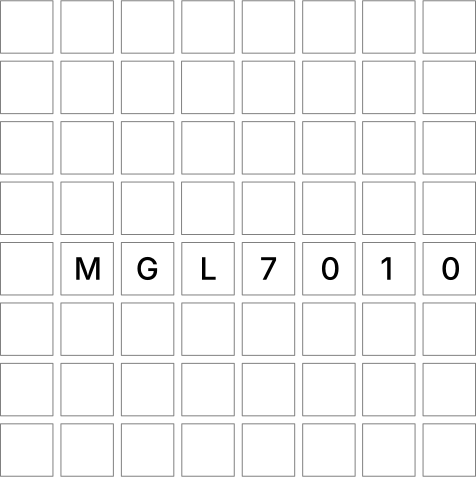
Illustrations of document characters as individual objects.
Why would we want the objects to know if they render on a given pixel position?
Printing occurs pixel by pixel, line by line, using polymorphism, we can easily figure out which colour a pixel is, by just checking of any object intersects a given position (tint pixel black).
We've used the same principle last session, for our simple printer (Composite Pattern example, a * was printed, whenever a composite happened to intersect with a printer position).
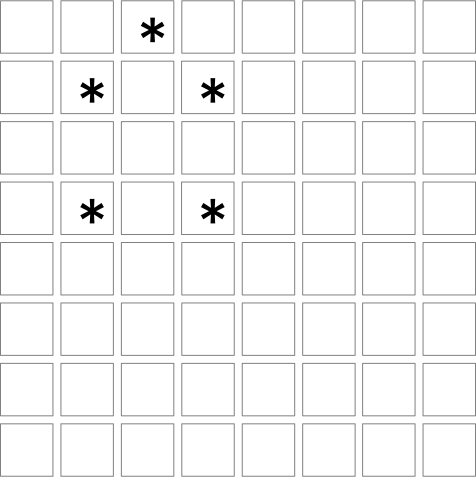
However, such a naive implementation would create hundreds (or thousands) of objects for any document page:
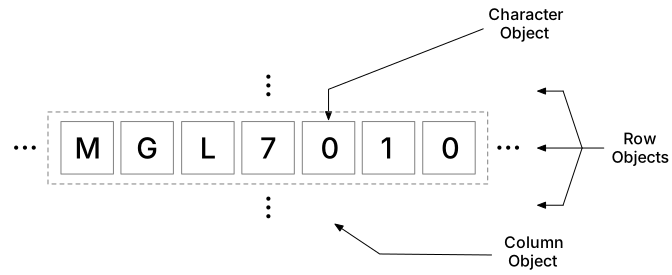
Illustration, taken from GoF, Design Patterns
If we consider, all typography information as intrinsic object state, larger documents could not possibly scale, for the resource consumption would be linear to the amount of characters in a document:
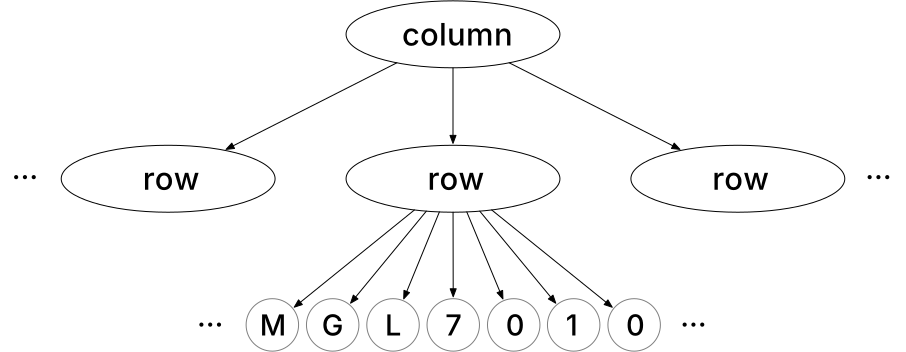
Illustration, taken from GoF, Design Patterns
The gist of the flyweight pattern is to outsource everything that does not have to be intrinsic state to a pool of shared flyweight objects.
- Objects from the flyweight pool are only initialized once, and can be shared on every reuse.
- The resource consumption for document glyphs is drastically reduced, to only information that cannot be outsourced or computed.
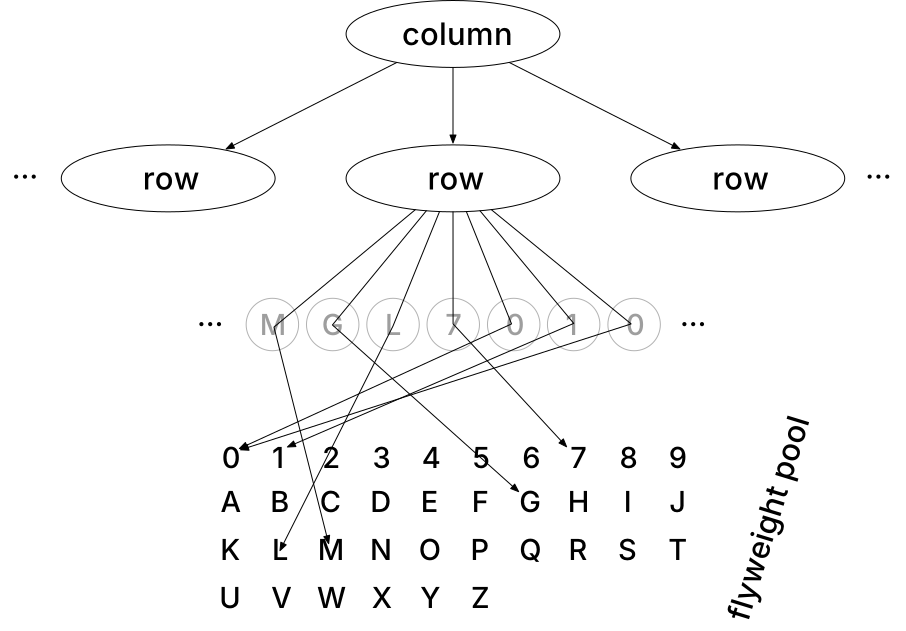
Illustration, taken from GoF, Design Patterns
- The above figure visualizes how generic flyweights with intrinsic state are reused over different context.
- An example is the
0character, which references to the same object in the flyweight pool, and only amends the pool object with contextual information.
UML Diagram
We'll now render the internal functioning of the flyweight pattern more concrete, by looking at the flyweight-enabled implementation for the editor example.
For a start let's reconsider how we can reuse a previously seen design pattern, to implement the typography properties can be attributed to either columns, rows, or individual characters.
How can we reuse a previous design pattern to reflect the nested glyph structure as a class diagram?
We can closely imitate what we've seen for the composite pattern. A component (glyph) can contain other components (glyphs), and either of them can be attributed with a typography, or use typography for rendering:
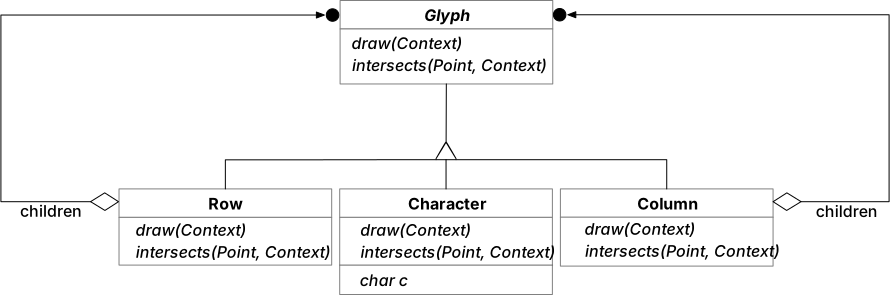
We can consider Context, as everything required to represent external (non-intrinsic state), while the prepared
flyweights are reduced to shareable, context-free information.
For a character, these would be:
- External: Position, some typographic properties (can be computed, to further optimize space)
- Intrinsic: The character, and it's graphic shape.
Note that flyweights are not limited to leaf objects in the composite structure:
- We can likewise imagine a gradual construction of state by a hierarchy of flyweights, incrementally enriching context. In the text editor example, we can consider lines, or columns as "Unshared" flyweights, adding to the context needed for absolute character rendering.
- The class diagram below shows how hierarchical flyweights are shared:
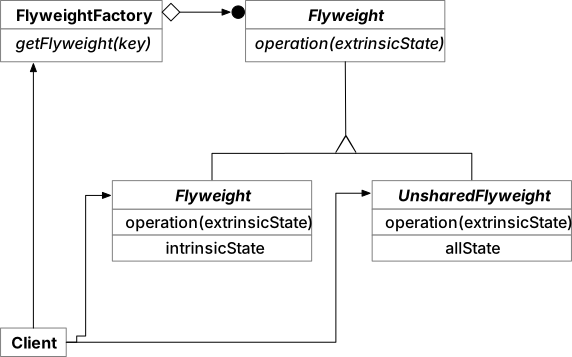
Illustration, taken from GoF, Design Patterns
The factory keeps track of shareable flyweight instances, similar as the singleton pattern would:
- If the flyweight instance has not yet been initialized (
== null), a new flyweight is created. - Otherwise, the share-able flyweight is returned.
Sample code for the FlyweightFactory:
getFlyweight(String key) {

  if (flyweightPool.contains(key)) {
    return flyweightPool.get(key);
  } else {
    Flyweight flyweight = new Flyweight(glyph);
    flyweightPool.put(key, flyweight);
    return flyweight;
  }
}
Given the above sample implementation, which collection type would the pool have?
A map. Each entry is a key value pair, linking flyweight identifiers to their sharable pool objects.
Usage
- Just because we can implement the Flyweight pattern, does not mean we should.
- Flyweight is at heart a pattern motivated by resource optimization.
- To fully unfold it's potential, a few conditions must hold:
- Massive replication of similar objects in a naive implementation.
- Common state in the similar objects, which can be contextually externalized (many characters share similar typography, can be stored externally).
- Intrinsic, i.e. unique information in Flyweights can be minimized (character glyphs only need to store the character they represent).
- In addition, intrinsic state which follows a predicatable structure, i.e. can be computed instead of being stored (offset resulting from position in a line can be computed).
Flyweight is for massive, repetitive object structures.
Unless you're dealing with hundreds or thousands of objects, that are mostly similar and follow a generizable pattern, don't consider the flyweight pattern.
Decorator
Intent
"Attach additional resposibilities to an object dynamically. Decorators provide a flexible alternative to subclassing for extending functionality."
-- GoF, Design Patterns
Motivation
Decorators are handy, whenever you want to add responsibilities to an object, without binding it to the entire class ( using inheritance).
You can think of the decorator as a proxy, wrapping around an existing object. All pre-existing method calls are just passed through, but the proxy (like a wrapper) adds some addition methods for custom behaviour.
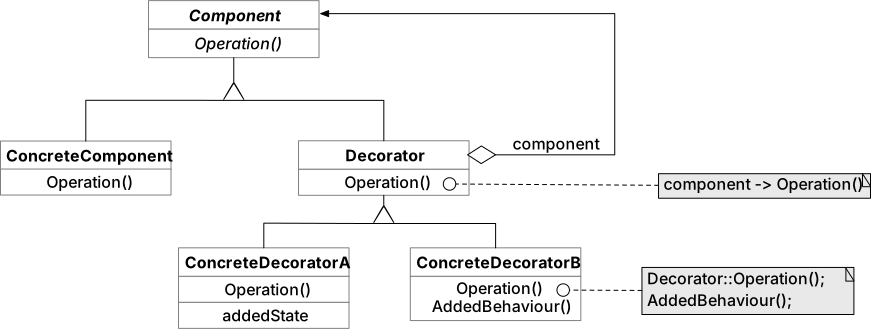
UML Diagram
- Since the
Decoratorhas to pass through all method calls to the wrappedConcreteComponentit naturally has the same interface (Component). - Additionally, there may be multiple
ConcreteDecorators at work providing specific extra behaviour or state.
Usage
Anything food and drink related makes a great example for the decorator pattern - simply because there's often " enhanced" variants of base dishes or drinks.
Let's implement a decorator pattern for a cup of coffee:
/**
 * The coffee interfaces corresponds to "Component" in the above UML diagram.
 */
public interface Coffee {

  /**
   * Returns the costs for a cup of coffee.
   */
  double cost();

  /**
   * Returns a string description of the beverage.
   */
  String description();
}
Interfaces alone don't do much, so lets create a concrete implementation, for example FilterCoffee:
/**
 * FilterCoffee corresponds to "Concrete Component".
 */
public class FilterCoffee implements Coffee {

  @Override
  public int cost() {
    return 150;
  }

  @Override
  public String description() {
    return "Filter coffee - the preferred beverage of any software engineer.";
  }
}
Now let's get started with the Decorators. We all agree that there are multiple ways to decorate any coffee:
- Ice cubes
- Milk
- Sugar
Each of these decorators changes price and description, so they all qualify as Decorators, wrapping our Coffee
component. Best would be to create a common abstract class wrapping the Coffee:
And of course finally we need a decorator:
public class IceDecorator extends CoffeeDecorator {

  public IceDecorator(Coffee coffee) {
    super(coffee);
  }

  /**
   * Ice cubes cost 50 cents extra.
   */
  @Override
  public int cost() {
    return coffee.cost() + 50;
  }

  /**
   * Ice must be mentioned as addendum in description.
   */
  @Override
  public String description() {
    return coffee.description() + " Enhanced with ice cubes.";
  }
}
Let's see how to create some iced coffee:
public static void main(String[] args) {

  Coffee basicFilterCoffee = new FilterCoffee();
  System.out.println(basicFilterCoffee.description() + "\nCosts: " + basicFilterCoffee.cost());

  // Now decorate with ice:
  Coffee icedCoffee = new IceDecorator(basicFilterCoffee);
  System.out.println(icedCoffee.description() + "\nCosts: " + icedCoffee.cost());
}
The iced-coffee example illustrates how the decorator pattern can be used to circumvent inheritance restrictions. We would not have been able to implement the same with basic inheritance, since double class-inheritance is not possible in java.
How can you create iced coffee with milk ?
Since Decorators inherit from Coffee, Decorators can be used to wrap other Decorators.
So all we need to add is another MilkDecorator class and use it to wrap the existing icedCoffee object:
Other structural patterns
Below an incomplete list of additional structural patterns (exceeding the scope of this course):
- Adapter: Convert interfaces or abstract classes to fit other interfaces, to create compatibility where it cannot be derived based on type system.
- Facade: Provide a unified interface for a set of interfaces, so individual interfaces become more manageable / easier to use.
- Proxy: Provide a surrogate to another object to control access.
Behavioural Patterns
In this unit we won't take a look at further behavioural patterns.
Other behavioural patterns
Below an incomplete list of further behavioural patterns (exceeding the scope of this course):
- Chain of Responsibility: Decouple actions from a single responsibility, let the chain decide who's most apt.
- Interpreter: Bundle language definitions with an interpreter class that knows how to interpret sentences.
- Iterator: An abstraction to walk through data structured without requiring knowledge on its internals.
- Mediator: Keep objects from referring to another directly, break coupling by enforcing a mediator.
- Memento: Capture an objects state, so it can be later restored.
- State: Allow an object to switch between different behaviour modes, depending on internal state.
- Strategy: Encapsulate algorithms, and offer them in an interchangeable form.
- Template Method: Define only macro steps of an algorithm in place, delegate step internals to subclasses.