Antipatterns and Code Smells
So far we've mostly looked at code from a green-field perspective, that is we've contemplated on which solution can be best applied when building software from scratch. In reality, you'll always have to work with pre-existing code, and most likely it is far from perfect. In this last lecture we'll categorize frequent issues with existing code, how to detect them, and what to do about it.
Lecture upshot
In this last lecture we'll take a dive into common code issues, how to identify and solve them, and which tools can help you along the way.
Antipattern definition
- Seemingly solves an issue
- Appears to address an issue.
- Was actively chosen.
- Has more bad consequences than good ones. Most frequently either...
- Ineffective at solving the original issue.
- Counter-productive at solving the original issue.
- There is an acknowledged better alternative to solving the issue.
No anti-patterns without patterns
There's a fine distinction between anti-patterns and mere complaints. For something to a recognized anti-patterns, there also has to be a proper, recognized way of better solving the original issue:
"AntiPatterns that describe only the negative solution are called pseudo-AntiPatterns (or more typically, complaints)" - antipatterns.com
Anti-pattern categories
Antipatterns in the original sense were strictly software design-focused. However, over time the term has adapted to also include project management and software architecture antipatterns.
For completeness, here's an overview over the three types of antipatters:
- Software design (or development) anti-patterns: Poor OO design solutions.
- Methodological / management anti-patterns: Issues with communication or task distribution, destructive to the software development processes.
- Architecture anti-patterns: Issues with
Not quite the opposite.
The general anti-patterns notion is not exactly the opposite of design patterns. The closest to a design-pattern opposing concepts is the sub-category of software design anti-patterns*.
Common anti-patterns
In the following we're looking at a selection of anti-patterns.
God Object
- Motivation / cause: I already have a class that handles my logic, I'll put the additional logic always into that class, so everything is consistently at the same place.
- Anti-pattern: A single class tends to hold all logic, or assume more responsibility than it should. The class is huge, cross-depends on everything.
- Actual pattern: Separation of concerns around reasonable boundaries, considering additional modules whenever adding new functionality.
Golden Hammer
- Motivation / cause: Shortage of time, need to speed up implementation. Insufficient proficiency with solution space.
- Anti-pattern: Obsessively relying on a familiar technology, instead of searching for best suited technology.
- Actual pattern: Run a requirement analysis, learn about all possible solutions, elaborate individual legitimacy, choose best suited.
- Example: Ignoring collection framework and solving each problem with arrays.
Lava Flow
- Motivation / cause: The code has evolved, existing functionality has changed or been replaced by new functions.
- Anti-pattern: I do not remove the legacy functions from the code, but keep them side by side with the revision, just in case.
- Actual pattern: Remove dead code.
Poltergeist
- Motivation / cause: Over-focus on separation of concerns, splitting up classes beyond what's reasonable to maintain cohesion.
- Anti-pattern: I'll introduce a few new classes only to trigger certain functionality, or to hide the actual logic behind an extra call.
- Actual pattern: Before splitting up classes, check if newly created classes provide a minimum value or contribution.
Primitive Obsession
- Motivation / cause: I need to implement different behaviour for various scenarios.
- Anti-pattern: Let's not create new classes when we can also use primitives. So
1means my customer is regular,2means they have a discount card, etc... - Actual pattern: Use constants or polymorphism.
Code smells
With anti-patterns we've looked at common decisions, i.e. conscient choices made to address a specific problem. Often times these anti-patters are not directly evident when looking at the code.
Nonetheless, experienced coders often develop a 6th sense for something "fishy" going on in the code, a bit like a predator bristling as it picks up a scent.

Capture of my predator-at-home. He developed a sixth sense for a bag of cat food being opened, only minimal indicators are sufficient for him to know there will be food.
Definition
Code smells are code characteristics, or tedious activities you encounter when working with code, indicating poor code quality or potentially design flaws. They do not necessarily imply a programming bug, but are a symptom of previous poor coding practices that may lead to technical debt if not addressed.
How are code smells different from programming errors ?
Programming errors (or bugs) are functional errors. A program may have zero bugs and still showcase code smells.
Code smells are not intentional, but a product of neglect. They describe unfavorable code properties that worsened over time, but were never actively decided on.
Conceptual Comparison
Antipatterns and code smells are not strictly disjoint, but we can recap a few indicators to categorize:
| Antipattern | Code Smell | |
|---|---|---|
| Origin | Conscious or habitual design choice that seems convenient. | Neglect, shortcuts, or local coding practices. |
| Spotting | Not trivial, often abstract / scattered in nature. | Easy. |
| Gravity | Inefficient or outright detrimental to purpose. | Local issue but may indicate an anti-pattern. |
| Action | Replace / refactor using established pattern or solution. | Refactor locally, investigate for larger antipattern. |
Common smells
In the following we're looking at a selection of common code smells.
Duplicated Code
- Symptom: The same, or very similar lines of code appear at multiple places in the codebase.
- Illustration: Duplicated code is highlighted in the same colour, similar code in similar colours:
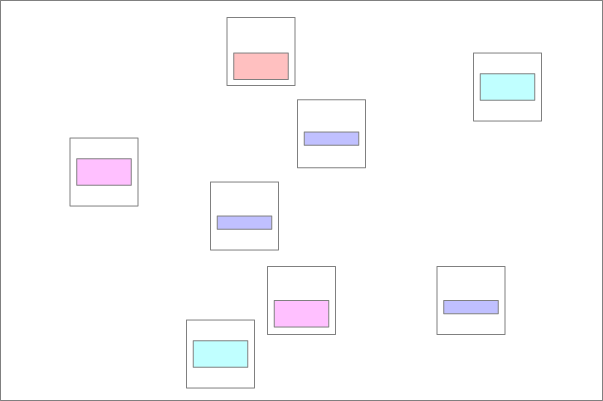
- Why is it an issue: Duplicated code is evil, because it makes code maintenance a lot harder: If you fix a bug, you easily overlook other places that likewise need patching.
- What to do: Extract a common method or common superclass. If the code is not exactly identical, use call parameters.
Long Method
- Symptom: A method is too long or nested. (The "max 20 lines rule" is a good orientation)
- Why is it an issue: Long blocks of code are hard to understand. Likely the method does more than it should, or can be simplified.
- What to do: Simplify code, make code more modular, e.g. replace sub-functionality by extracted methods.
Shotgun Surgery Needed
- Symptom: You want to make a seemingly small change, but notice implicit subsequent changes are needed in many other classes.
- Illustration: An initial change (leftmost blue circle) to a class implicitly required many follow-up changes at various places in multiple classes.
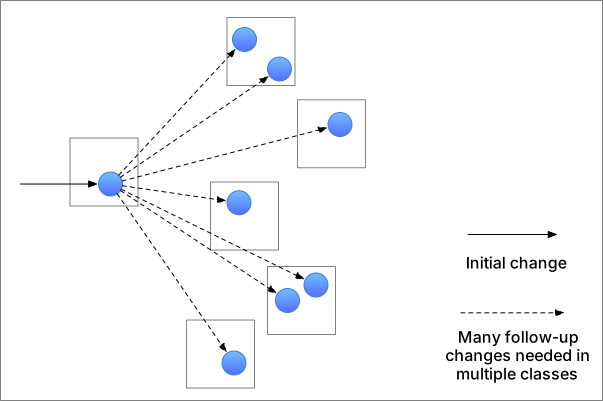
- Why is it an issue: If a supposed benign change implicitly had effects on many other parts of the codebase, this suggests low cohesion.
- What to do: See if anything affected by the change (all blue circles) is a candidate for refactoring into an additional dedicated class.
Feature Envy
- Symptom: A class relies to heavily on another classes internals. E.g. a method using more data from another class than its own.
- Illustration: A class strongly depends on features of a specific other class, e.g. for property access. There's a strong unidirectional coupling between two separate classes.
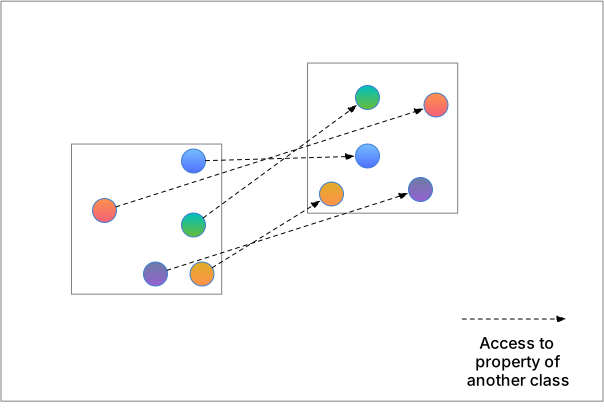
- Why is it an issue: Strong coupling suggests the class boundaries do not lie where they are supposed to.
- What to do: Feature envy, i.e. specific unidirectional coupling could be an indicator one class should assimilate the other.
Switch Statements
- Symptom: Switch statements are an indicator you missed out on polymorphism. Possibly a god class or enums that should be broken down.
- Example:
/**
 * Example taken from Martin Fowler's "Refactoring", page 205.
 * The function computes the speed of different birds.
 */
double getSpeed() {
    switch (_type) {
        case EUROPEAN:
            return getBaseSpeed();
        case AFRICAN:
            return getBaseSpeed() - getLoadFactor() *
                _numberOfCoconuts;
        case NORWEGIAN_BLUE:
            return (_isNailed) ? 0 : getBaseSpeed(_voltage);
    }
    throw new RuntimeException ("Should be unreachable");
}
- Why is it an issue: Logic that should be distributed over different objects is concentrated in a single long series of conditions. Hard to read and even harder to maintain. Whenever a new bird comes along the switch statement will grow.
- What to do: Use polymorphism, place the bird logic in individual sub-classes:
---
title: Polymorphism
---
classDiagram
    class Bird {
        +getSpeed()
    }

    class European {
        +getSpeed()
    }

    class African {
        +getSpeed()
    }

    class NorwegianBlue {
        +getSpeed()
    }

    Bird <|-- European
    Bird <|-- African
    Bird <|-- NorwegianBlue
Sample code and diagram taken from Martin Fowler, Refactoring, pages 205-207.
Magic Values
- Symptom: Primitive values are used to encode semantics.
- Example:
// customerType should not be a primitive, there is no link
// between the magic value (1, 2, 3) and the semantic it carries...
public double calculateFinalPrice(double originalPrice, int customerType) {
    // Magic values used directly in the code
    if (customerType == 1) { // 1 = Regular
        return originalPrice;
    } else if (customerType == 2) { // 2 = Premium
        return originalPrice * 0.9; // 10% discount
    } else if (customerType == 3) { // 3 = VIP
        return originalPrice * 0.8; // 20% discount
    } else {
        return originalPrice;
    }
}
- Why is it an issue: There is no link between the primitive value and the semantic it carries. The code is hard to understand and maintain.
- What to do: Replace by an enum or constants.
Lengthy comments
- Symptom: In general, comments are desirable. By long blocks of comments can be an indicator for trouble.
- Example:
public double calculateProjectileRange(double velocity, double angleInDegrees, double height) {
    // The following formula calculates the horizontal range of a projectile
    // launched from a certain height with an initial velocity at a given angle.
    //
    // Formula explanation:
    // R = (v * cosθ / g) * [v * sinθ + sqrt((v * sinθ)^2 + 2gh)]
    //
    // where:
    //   v = initial velocity
    //   θ = launch angle
    //   g = gravitational acceleration (9.81 m/s^2)
    //   h = initial height
    //
    // This formula accounts for the projectile being launched from above the ground
    // (h > 0). If h = 0, it simplifies to the standard range formula:
    //   R = (v^2 * sin(2θ)) / g
    //
    // Warning: This formula assumes no air resistance, a flat Earth, and constant gravity.
    // It’s not valid for extremely high velocities or very large distances.

    double g = 9.81;
    double angleInRadians = Math.toRadians(angleInDegrees);

    return (velocity * Math.cos(angleInRadians) / g) *
           (velocity * Math.sin(angleInRadians) +
            Math.sqrt(Math.pow(velocity * Math.sin(angleInRadians), 2) + 2 * g * height));
}
- Why is it an issue: If a lot of explanation is needed, then changes are high the code is overly complex and hard to understand.
- What to do: First see if you can accurately describe what's going on in simpler terms. If that's not possible, revisit the code itself and reiterate.
In this example, the code does not have much potential for simplification, as it is simply the exact formula for projectile range. If anything we could break up code into partial terms, and provide an intuitive function name per term.
Lazy class
- Symptom: Presence of multiple, almost empty methods that only seem to delegate function calls directly to other classes.
- Example:
class Poltergeist {

    public static void doSomething() {
        // The only thing this class does, is to
        // forward a call elsewhere...
        Foo.doSomething();
    }
}
- Why is it an issue: The class still leaves a footprint in the codebase, but provides no value. The call graph is obscured.
- What to do: Check if the class is actually are "Poltergeists". If they are, remove these proxies and call what they delegate to directly.
Automatic smell detection
Previously we've seen that "code smells" are merely indicators and still require some human intuition to make a choice on whether some refactoring is an adequate action. In addition to these vague guidance, there are also a few easier metrics to decide on code quality. These are not antipatterns or smells, but still provide useful feedback on code quality.
Checkstyle
For syntax validation, linters usually do not build an AST and directly reason on the extracted token structure. Linters usually focus on enforcing visual coding conventions:
- Indentation
- Placement of brackets
- Linebreaks
- Variable naming
- ...
An example is Checkstyle, which we've already seen in class. Checkstyle uses a configuration file to ensure all team members use the same visual code conventions. Why is this useful ?
- Code is easier to read if everyone uses the same convention.
- (A lot) fewer conflicts when working with a VCS, for example git.
Why is this relevant in the context of code smells
Unformatted code is a sign of code negligence.
Checkstyle IDE plugin
- Checkstyle is available as IDE plugin.
- In most classes, I recommend using the google checkstyle coding convention as configuration file.
Complexity
Often there are multiple ways to code the same functionality.
- In the best case, the behaviour of a complex solution is the same as of a simpler solution.
- But complex code is hard to understand, work with and maintain.
Ideally your code isYour code must not just be correct, but also as simple as possible.
Why is this relevant in the context of code smells
Detecting high complexity is the continuation of detecting overly long methods. It is an indicator too much is handled by a method or class.
Cyclomatic complexity
Cyclomatic complexity gives you a notion of how complex your code is, and provides you hints on how to simplify you code.
More concretely, to determine a cyclomatic complexity metric, we uses the AST to create a control flow graph representation of the program:
- Control structures in the AST translate to graph nodes: function start & return, if, else, loops, code blocks.
- Execution paths between control structures translate to graph edges.`
Based on the control flow graph properties, we compute a complexity metric, per method:
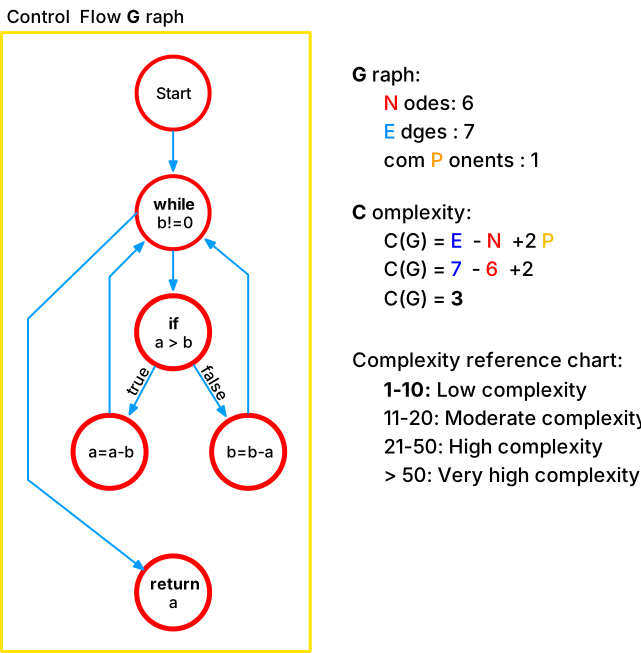
There's no dedicated maven plugin, but there's an IDE plugin for instant visual complextiy feedback, and checkstyle (for which there's a maven plugin) can be configured to assess cyclomatic complexity. ( Not covered in this course.)
Spotbugs
Spotbugs (formerly FindBugs) is an AST analyzer on steroids, that systematically searches your code for potential bugs, or even code constructs that often lead to bugs.
- Example: if you have a getter, returning a mutable object, FindBugs will let you know.
Spotbugs IDE plugin
Spotbugs is available as IDE plugin. After installation, you can access a new SpotBugs menu on the base bar, to scan your project, or a specific file for potential bugs.

Dependency matrix
- IDEs do not just deal with individual lines of code, but can also provide you with insights regarding macro-structures of your code.
- An example is the dependency matrix:

Open with: "Code -> Complexity Matrix". Then click a position and read: "green_ depends on _yellow".
- Each line and column represents a class, each cell tells how many times a class calls or references it's counterpart.
- The matrix is automatically sorted bottom up, i.e. classes at the bottom are the ones needed most, classes to the top are the ones needed least.
- The matrix also gives some insight on suspicious constructs, i.e. cyclic references, which are represented as red squares.
Use the matrix to verify architectural patterns, e.g. MVC
The dependency matrix is an efficient way to analyze whether a project respects the MVC pattern: The Model only deals with data, and must not have any calls to Controller (logic) or representation (View). Model package must be the lowest classes in the matrix. The Controller changes model state, but does not care about representation. It has fewer usages than the model, but more than the view (no-one calls the view). The controller package's classes must be located between model and view in the matrix.
PMD
For the really (really, really) brave. Check out PMD (Project Meets Deadline)
- It's actually not easy to write code where PMD has absolutely no complaints. (False positive alert !)
- But you can be sure your code improves a lot as you try (and you'll learn a lot)
PMD IDE plugin
PMD is available as IDE plugin. After installation, you can run the
static code analysis in Tools -> PMD -> Run predefined -> All
Complexity, Spotbugs and PMD are maven compatible
See INF2050 course notes for a maven plugin configuration of these tools, to automatically audit code quality as part of the build process.
Refactoring Support
You do not need to make all refactoring changes manually. Most IDEs actually come with a well-equipped refactoring menu, that provides a swiss-army-knife for the most common refactoring scenarios.
Don't refactor blindly.
Of course you still need to first identify where refactoring is adequate! But following code-smells and hints by checkstyle/PMD/complexity is a good lead.
Changing signatures
Similar to renaming is modifying the signature of a method, e.g. to adding an input parameter.
- You have to consistently modify all method calls, or your code won't compile.
- IntelliJ can once more help you with the job:
- Change only the signature definition (now your code has errors)
- Click the
@Rannotation on the left side-pane - Add a default value for the new parameter, in all existing method calls
- Alternatively you can use the dedicated method signature refactor dialogue with
Command (⌘) + F6(andFnon laptops). The dialogue has extra features, e.g.:- Change order of parameters
- Method overloads
Extract method
- Often you have a few lines of code that perfectly do a job, but you'd like to have them accessible as a dedicated
method (and that method simply being called where the code currently is).
- Example:
/**
 * Creates an interleaved true, false, true, false... array and prints the outcome.
 * @param length as the total amount of values to be placed in the result array.
 */
void foo(int length) {

  // initialize a new all-false boolean array
  boolean[] myArray = new boolean[length];

  // convert every value at an even position to true:
  for (int i = 0; i < myArray.length; i++) {
    if (i % 2 == 0) {
      myArray[i] = true;
    }
  }

  // print the array content
  for (int i = 0; i < myArray.length; i++) {
    System.out.println(myArray[i]);
  }
}
- Could be refactored to:
/**
 * Creates an interleaved true, false, true, false... array and prints the outcome.
 * @param length as the total amount of values to be placed in the result array.
 */
void foo(int length) {

  // initialize a new all-false boolean array
  boolean[] myArray = new boolean[length];

  setEveryEvenPositionTrue(myArray);

  // print the array content
  for (int i = 0; i < myArray.length; i++) {
    System.out.println(myArray[i]);
  }
}

/**
 * Sets every even position of a provided array to true.
 * @param myArray the array to be modified.
 */
private static void setEveryEvenPositionTrue(boolean[] myArray) {
  // convert every value at an even position to true:
  for (int i = 0; i < myArray.length; i++) {
    if (i % 2 == 0) {
      myArray[i] = true;
    }
  }
}
- You could manually edit the code to create a new method, copy&paste the selected lines, and then insert a method call in the original location...
- Or you can just use an IntelliJ shortcut:
Option (⌥) + Command (⌘) + M
There is also an inverse operation: Inline method. The reverse replaces a call to a method, by the method's code. Highlight the method call and hit
Option (⌥)+ Command + N.
Magic values to constants
- Hard coding magic values is considered bad practice, even if the variable appears only once.
- Select the variable and hit:
Option (⌥) + Command (⌘) + C
Fields to method parameters
- Often you have values in a method that should be injected from outside.
- You can mark the parameters and hit
Option (⌥) + Command (⌘) + P - Example:
/**
 * Creates an array and calls toto on it.
 * @param length as the size of the array to create before passing it to toto.
 */
void foo(int length) {

  // initialize a new all-false boolean array
  boolean[] myArray = new boolean[length];
  toto(myArray);
}
- Converts to:
/**
 * Receives an array and calls toto on it.
 * @param myArray as the array to call toto on.
 */
void foo(boolean[] myArray) {
  toto(myArray);
}
Expression to variable
- Longer expressions can be hard to understand:
- You can replace parts of the expressions by named variables with
Option (⌥) + Command (⌘) + v:
boolean iSmallerMaxValue = i < 3984574;
int correctAnswer = 42;
boolean iIsEven = i % 2 == true;
if(iSmallerMaxValue && iIsEven || i ==correctAnswer){
...
}
Literature
Inspiration and further reads for the curious minds: